

Automation Provider Tour
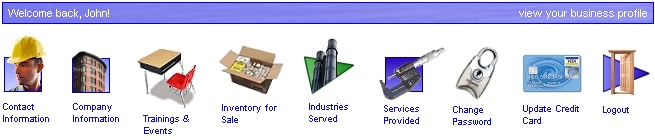
Welcome to the Local Automation provider tour! Our provider accounts have been specifically designed for businesses that manufacture, sell, and support automation technologies. It doesn't matter if you're a multi-million dollar manufacturer or a one-man systems integrator... you've come to the right place. As a registered automation provider, you will gain access to a provider's control panel which will allow to manage all aspects of your Local Automation account. Using this control panel, you can:

view and respond to automation questions in your area
view and respond to projects sent "out for bidding" in your area
advertise your products and services
advertise your trainings and events
post inventory items for sale
build a comprehensive profile of your business
link your business profile to your automation partners
add local contacts to your business
update your company contact information
receive automatic notification of urgent support requests in your area
change passwords and login information
update your credit card information
advertise your custom-designed automation systems
and much more! (see below)
All of the content on LocalAutomation.com is posted and maintained by our automation providers using their control panels! A portion of a provider control panel is shown below:
Types of Provider Accounts
Currently, there are three types of provider accounts: manufacturer accounts, distributor/rep accounts, and systems integrator accounts. You can also create combination accounts, such as: distributor/integrator, manufacturer/integrator, or even manufacturer/distributor/integrator! The price is the same, no matter how you set it up.
Depending on the type of account that you create, you will also have access to one or more of the following features:
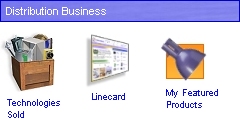
create a technology profile by linking your business to the automation technologies that you sell and support
create an online linecard by linking your business to all of your vendors
feature up to 15 products at any given time... complete with pictures, a detailed description of each product, and a link to a website of your choosing
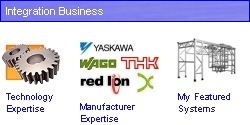
create a technology profile by linking your business to the automation technologies that you integrate and support
link your business to the manufacturers with whom you have integration experience
feature up to 15 of your systems at any given time... complete with pictures, a detailed description of each system, and a link to a website of your choosing
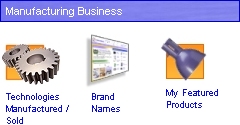
create a technology profile by linking your business to the automation technologies that you manufacture
link your business to all of the brand names that you represent (e.g. a Danaher provider would like to Danaher, Kollmorgen, IDC, etc.)
feature up to 25 of your products at any given time... complete with pictures, a detailed description of each product, and link to a website of your choosing
Additional account types will be coming soon. If your business does not currently fall into one of the three existing classifications, simply pick the best option. After your account is open, you can make changes at any time using your control panel.
What Does It Mean To Be Local?
The automation industry is a complex, highly-specialized industry. A single automated machine can contain hundreds of intricate mechanical and electronic devices, each requiring specialized training to install, service, and support. Businesses that invest in automation understand the complexity of their investment and, as a result, often insist on purchasing automation products and services exclusively from local providers.
When visitors come to the LocalAutomation.com website and view the provider directory or view the list of upcoming events, they want to see "local" providers and "local" events. When they post questions or send projects "out for bidding", they are expecting to receive responses from "local" providers.
What does it mean to be "local"?
When you open a provider account, you will become local contact #1 on that account. You can create up to 14 additional contacts on the account - for a total of 15 local contacts. Each local contact, including yourself, can have a different local address, phone number, fax number, e-mail, etc.
On the LocalAutomation.com website, visitors can enter the zipcode of their location. They are then taken to a local homepage which is dedicated to their local area. A visitor will be able to view your business (along with all of your associated products, events, etc.) as long as you have at least one local contact near that visitor's location (note: automation product manufacturers will be visible nationwide, regardless of where their contacts are located).
What does it mean to be "near"?
We define "near" differently for different parts of the country. In the Northeast, for instance, sales territories are generally fairly small and "near" may be defined as "within 150 miles". In the Great Plains and Rocky Mountain regions, however, sales territories are very large and "near" may be "within 400 miles".
When a vistor enters his/her zipcode, we determine which part of the country he/she is in and then, using a proprietary algorithm, determine which automation providers have local contacts "near" that visitor. Those providers will be displayed to the visitor as "local" providers. All it takes is one local contact, and you're business is considered local.
Here's an example:
You are the owner of an automation distributor which is based in Boston, MA. You open a provider account and enter your local contact information in Boston. You are now contact #1. You have a Sales Engineer that lives in Buffalo, NY. He has a home office there and services that territory. You enter his local information, including: his cell phone number, e-mail address, and local address in Buffalo. He is now contact #2. Finally, you have an Applications Engineer that lives in Pierre, South Dakota. Again, he services that area. You enter him as contact #3 and include all of his Pierre information.
In this example, your distribution business will be "local" to Boston, Buffalo, and Pierre. Let's assume that "near" is defined as "less than 150 miles" for Boston and Buffalo and "less than 300 miles" for Pierre. In that case, any LocalAutomation.com visitor that picks a zipcode within 150 miles of Boston or Buffalo or within 300 miles of Pierre will be able to view your online business profile. The visitor will also be able to view all of your featured products, featured systems, inventory items, and upcoming events (provided the location of the event is "near" the visitor, as well).
Lastly, your local contacts will receive automatic e-mail notifications anytime a site visitor posts a question or project in their area. Using the above example, all questions and projects that are submitted within 150 miles of Buffalo will be e-mailed to your Sales Engineer. The Sales Engineer will also be able to view the questions and projects when he logs into the control panel. Similarly, any question or project posted within 300 miles of Pierre will be sent to your Applications Engineer. Once the e-mails are sent, it is then your responsibility to share this information between your contacts and put together the right resources for answering the question / project.
One last note - the regional size of "near" may be modified by LocalAutomation.com at any time (if deemed necessary). However, we will never set it to less than 100 miles (radius) for any given territory. Therefore, you are always guaranteed that your business profile will be visible to anyone within 100 miles of any one of your contacts.
Questions & Projects
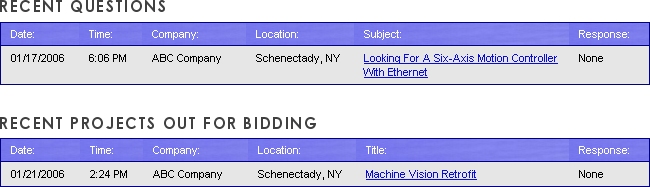
In the provider control panel, you will see a list of all questions and projects which have been recently submitted in your area (see sample, below). You may view the details of any question or project by clicking on its link.
Some users will include their contact information with their questions and projects. Others will post confidentially. For those that include their contact information, you may contact them directly and, hopefully, start a new business relationship. For those questions and projects that are posted confidentially (i.e. without contact information), you may respond to the question or project through the LocalAutomation.com website. We will forward your response directly to the user, along with your contact information. In addition, users will be able to view your response anytime that they log into their user control panel. At the user's discretion, they may give you their contact information and open a direct dialogue.
Technology Linking
As a registered automation provider, you will have the ability to increase the visibility of your business profile by linking your business to relevant automation technologies.
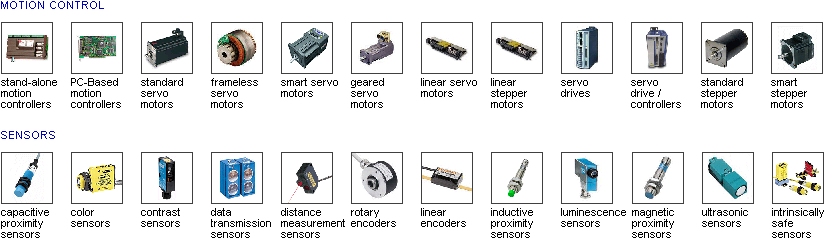
When you link your business to a technology, you are indicating that your business sells and/or supports that particular technology. When a site visitor selects that technology in the provider directory, your business profile will appear.
Technology linking is accomplished in the provider control panel using a simple interface, part of which is shown below:
Manufacturer Linking
As a registered automation provider, you can increase the visibility of your business profile by linking your business to automation manufacturers.
As a distributor, you will link your business to all of your vendors. In doing so, you create an online linecard and ensure that your business will show up as local distributor anytime a visitor views one of your vendor's products or profile pages.
Similarly, if you are a systems integrator, you will link you business to all of the manufacturers with whom you have integration experience. In doing so, you will be listed as a local integrator for all of those manufacturers.
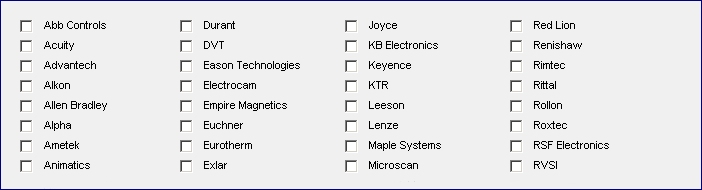
Manufacturers will need to link their profiles to all of their brand names. For instance, a Parker salesman who opens a provider account will want to link his account to Parker, CTC, Bayside, Daedal, etc. - all of the brand names that he sells and supports. This will ensure that his provider profile page shows up anytime a site visitor looks up any of those companies. It will also ensure that his profile is correctly linked to all of the appropriate distributors and systems integrators.
Manufacturer linking is accomplished in the provider control panel using a simple interface, part of which is shown below:
Trainings & Events

Build brand awareness, promote your technological capabilities, and attract new customers with local trainings and events! As a registered automation provider, you will be able to post up to fifteen trainings / events at any given time. Each event will be viewable on the LocalAutomation.com events page, as well as your business profile page. Your events will be searchable based on your company name, the name of the event, and the description of the event. Your events are also guaranteed to appear on your local main page of LocalAutomation.com during the seven days leading up to the event!
Traditionally, the only way to get the word out about a local training or event was through mass mailing, mass faxing, mass e-mailing, or through your local sales force. These methods work well at reaching your existing customer base (i.e. those customers for whom you already have addresses, e-mail addresses, and fax numbers)... but how do you attract new customers?
LocalAutomation.com was designed to be local and to ensure that your trainings and events will be highly visible to all site visitors in your area.
Featured Products

Each registered distributor and manufacturer may promote up to fifteen products at any given time. Each product will appear on the featured products page as well as your business profile page. Your products will be searchable based on the name of your company, the name of the product, the product description, and the technology categories that are associated with the product (i.e. servo motors, smart cameras, etc.). Your products will also be randomly selected to appear on your local main page of LocalAutomation.com.
Your product listings may include pictures and a hyperlink back to a website of your choosing.
Featured Systems

As a systems integrator, your company spends endless hours designing and building unique automation systems. These systems are often sold to a single customer, and the rest of the automation industry remains unaware of your designs and your capabilities.
As a registered systems integrator, you may promote your systems in our 'featured systems' directory. Each systems integrator may feature up to 15 systems at any given time. Each system will appear on the system directory page as well as your business profile page. Your systems will be searchable based on the name of your company, the name of the system, the system description, and the technology categories that are associated with the system (i.e. servo motors, smart cameras, etc.).
Your system listings may include pictures and a hyperlink back to a website of your choosing. This is a great way to advertise your hard work and automation expertise!
Inventory for Sale

Registered automation provider may list up to fifteen inventory items for sale at any given time. Each inventory item will appear on the inventory clearance page and will be searchable based on the name of your company, the name of the inventory item, the description of the inventory item, and the technology categories which are associated with the item (i.e. servo motors, smart cameras, etc.). Your inventory items will also appear on your provider profile page and will be randomly selected to appear on your local main page of LocalAutomation.com.
Your inventory listings may include pictures and a hyperlink back to a website of your choosing.
Summary
LocalAutomation.com provides an unprecedented opportunity for you to promote your business, attract new customers, and stay on top of new projects as they develop in your local marketplace. As a member of this site, you will gain access to a powerful set of online tools which are specifically designed for the automation industry. You can use these tools to advertise your products and services, advertise your trainings and events, and much more... and if you can attract just one new customer this year, your entire year's membership will pay for itself!
Best of luck in 2006! If you have any questions, please e-mail us at support@localautomation.com